
HalabTech Tool v1.1.6 Free Download for Windows Latest Version [2026]
Are you facing problems with Android phone software, FRP locks, screen locks, or firmware flashing? HalabTech Tool is a Windows-based software that provides a practical solution for mobile technicians. HalabTech Tool offers functions such as FRP reset, screen lock removal, firmware flashing, IMEI repair, device information reading, bootloader unlock and relock, Auth Bypass, DIAG enablement, and user data formatting. This tool also fixes software errors.
What is HalabTech Tool v1.1.6?
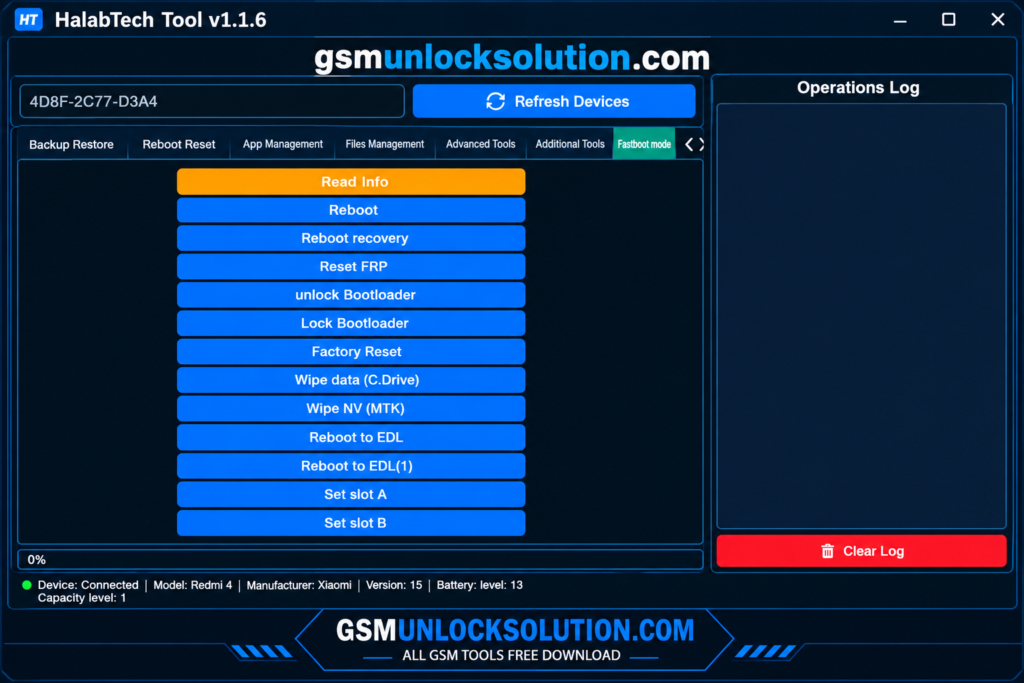
HalabTech Tool is an Android servicing and mobile repair tool designed to help mobile technicians and users repair software problems. HalabTech Tool supports ADB and Fastboot, with supported MediaTek (MTK) and Qualcomm devices. It supports popular Android brands, including Samsung, Huawei, OPPO, Vivo, Xiaomi, and Tecno, along with MediaTek (MTK) and Qualcomm chipsets. It has a user interface.
Main Functions of HalabTech Tool
FRP Bypass & Reset
Removes Factory Reset Protection from supported Samsung, Xiaomi, Vivo, Oppo, Realme, Huawei, and Tecno devices, including MTP-mode and test-point methods on selected models.
Android Screen Unlock
Handles forgotten PIN, password, and pattern locks so technicians can get customers back into their devices.
Firmware Flashing
Flashes stock firmware to fix boot loops, repair corrupted system files, restore dead phones, and update Android software on supported models.
MTK Support
Deep MediaTek servicing over USB: FRP reset, bootloader unlock and relock, userdata format, and Mi Account reset on many MTK chips without authorization prompts.
Qualcomm & EDL Support
Qualcomm servicing through EDL (9008), Fastboot, and test point with a matching loader: partition flashing, FRP reset, and device detection.
Huawei & Kirin Support
FRP reset on Kirin-based Huawei phones (including Kirin 659, 710, 960, and 970) plus root-file flashing for selected Android 10 and 12 builds.
Bootloader Unlock / Relock
Unlocks and relocks bootloaders on supported Xiaomi, Samsung, and MTK devices, including Redmi Note 8 and 8T with different board IDs, with an option to restore the original bootloader.
Samsung Extra Functions
Samsung account removal, EFS read/write on Android 12, and added Arabic, Turkish, and Farsi language support on Android 12.
Simple Multi-Brand Dashboard
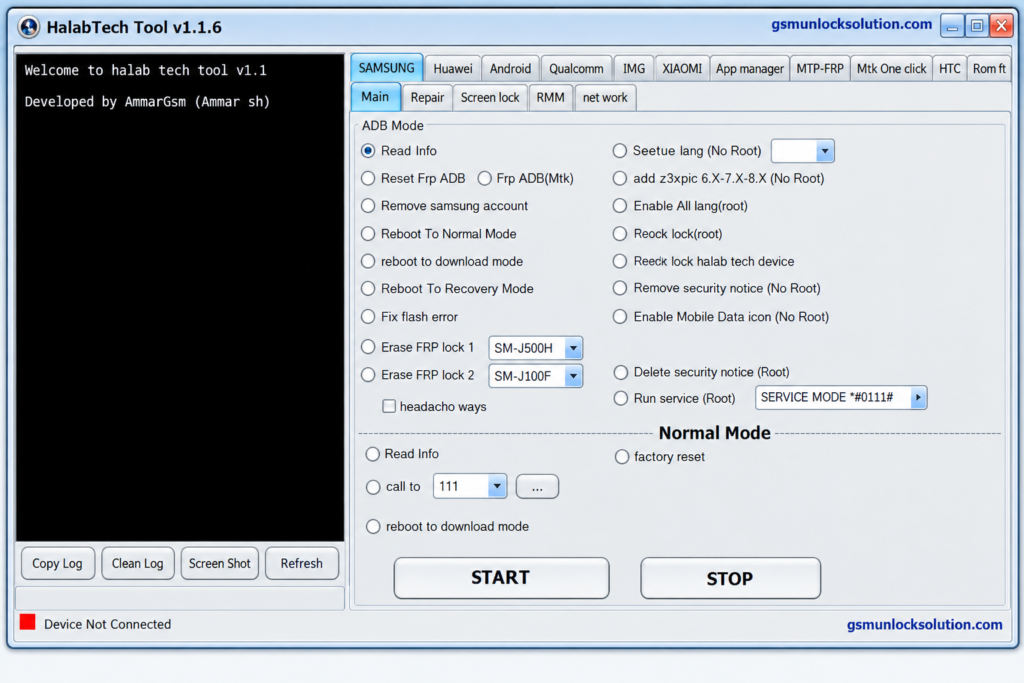
All brands and chipsets sit in one organized window with clear tabs, so common repair functions are quick to find even during a busy shop day.
What’s New in HalabTech Tool?
- Redmi Note 8 / 8T bootloader unlock for all board IDs, plus restore-original-bootloader option
- Xiaomi MTK without-auth USB support: FRP reset, bootloader unlock/relock, format userdata, and Mi Account reset across many MTK chips
- More Samsung MTK models added for USB/EDL FRP (A01 Core, A10s, A12, A31, A32 4G, A41, M01, M31)
- Expanded Oppo and Realme MTK support for FRP reset and formatting
- Samsung: Arabic, Turkish, and Farsi languages on Android 12, Samsung account removal, EFS read/write on Android 12
- Huawei: FRP reset on Kirin chips and root-file flashing for Android 10 and 12
- Qualcomm: partition flashing, FRP reset via test point with loader, MDM skip on test point
- Updated MTP-FRP method and translation updates for Android 9 and 11
Pros and Cons
Pros
- Free edition; no activation needed according to the release notes
- Very wide brand coverage: Samsung, Huawei, Xiaomi, Oppo, Vivo, Tecno, Realme, and more
- Supports MTK, Qualcomm, Kirin, and SPD chipsets in one tool
- FRP, flashing, unlocking, and IMEI maintenance in a single dashboard
- Test-point and EDL support for deeply bricked phones
- Simple tabbed interface that is easy to navigate
Cons
- Every function depends on the exact model, chipset, and firmware; nothing is universal
- Qualcomm and Huawei operations need the correct loader file
- Proper MTK/Qualcomm/ADB USB drivers must be installed first
- Test-point and EDL work needs real hardware skill, not beginner territory
- Some advanced services may need online or authorized access
- Users report freezes or ‘no response’ errors when the wrong model is selected
- Not an official tool from any phone brand
System Requirements
| Requirement | Details |
| Operating System | Windows 7, 8, 8.1, or 10 (64-bit recommended) |
| Processor | Intel or AMD dual-core processor or better |
| RAM | 4 GB minimum, 8 GB recommended |
| Storage | 1 GB free space plus 274 MB for the tool package |
| USB Connection | Good-quality USB cable with MTK, Qualcomm, and ADB drivers installed |
| Internet Connection | Required for online server functions and software updates |
Looking for another useful tool: EMC Activator v1.5.2 Free Download Setup for Windows Latest Version [2026]
How to download the HalabTech Tool?
- Find a trusted GSM tools website hosting the HalabTech Tool package and confirm the version before downloading.
- Download the ZIP package (around 200 – 274 MB, depending on the mirror).
- Scan the downloaded file with your antivirus before opening it.
- Extract the archive with WinRAR or 7-Zip.
- Install the required USB drivers ADB, MTK, and Qualcomm or skip this if they are already installed.
- Run the HalabTech Tool setup and follow the basic on-screen instructions.
- Launch the tool from the desktop shortcut, preferably as administrator.
- Connect your supported Android phone over USB in the mode the function needs (MTP, Fastboot, EDL, or test point).
- Pick the matching brand tab and function, then let the operation finish before disconnecting the phone.
Conclusion
HalabTech Tool is a useful tool for Android mobile repair and software servicing. It offers features such as FRP reset, screen lock removal, firmware flashing, device information reading, and other maintenance tasks. It works very smoothly and quickly. It has a simple interface that is easy for everyone to use. Whether you are a beginner or an expert. You can just download the tool and solve the problem.
FAQ’s
Is HalabTech Tool v1.1.6 free?
Yes, v1.1.6 is shared as a free edition, and the release notes say no activation is needed. Some advanced server-based services may still need online access.
Is HalabTech Tool safe to use?
It is widely used by technicians, but only download it from sources you trust, scan every file, and back up the phone’s data first. Flashing and unlocking always carry some risk.
Which brands does it support?
Samsung, Huawei, Xiaomi, Oppo, Vivo, Tecno, Realme, Infinix, Nokia, LG, and others, depending on the exact model and chipset.
Do I need a loader file?
For Qualcomm EDL and some Huawei test-point operations, yes, you need the loader that matches the phone model, or the tool cannot talk to the device.
Why does the tool freeze during FRP reset?
Forum users report this mostly when the selected model does not match the connected phone. Double-check the model, reconnect the phone, and try again.




One Comment