
GEN PRO TOOL V2.02.23 7.8 Free Download Latest Version 2027
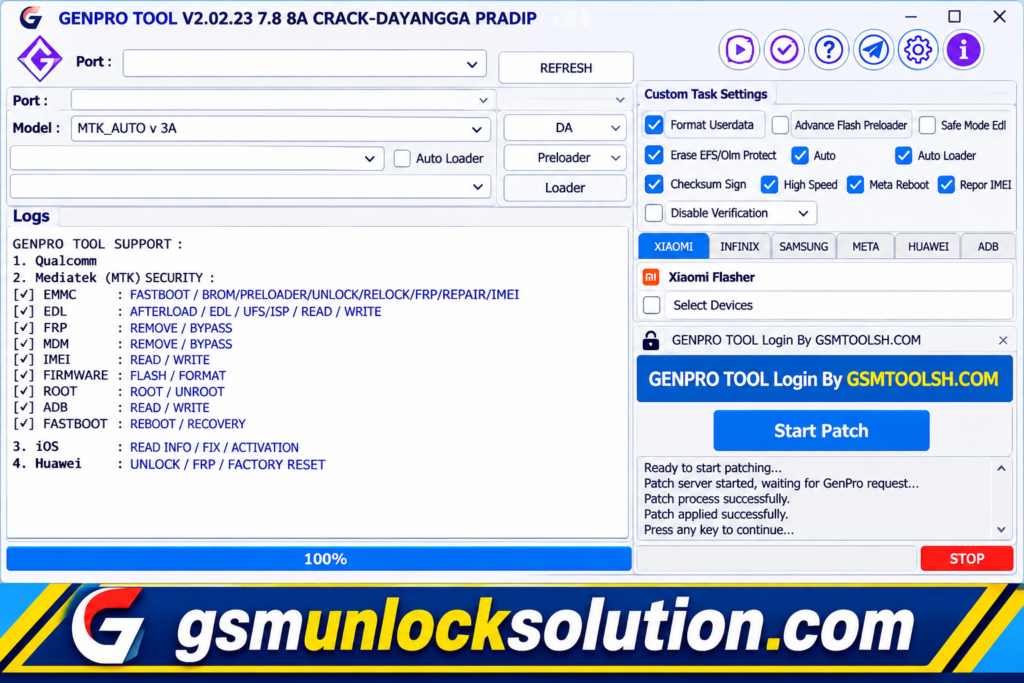
When you are struggling with FRP locks, Mi Account issues, bootloader problems, or IMEI errors, GEN Pro Tool provides mobile servicing functions and repair tasks. GEN Pro Tool is an all-in-one mobile servicing software that includes features for FRP bypass, bootloader unlocking and relocking, firmware flashing, eMMC formatting, IMEI-related tasks, and device repair, including Flash, Format META, Repair, and IMEI.
What is GEN PRO TOOL?
GEN Pro Tool is an all-in-one Android mobile servicing software that helps technicians unlock, flash, and repair. It is multiple repair functions in one place, it easier to handle different Android software problems without using any effort. GEN Pro Tool supports different chipsets, including Qualcomm, MediaTek (MTK), Spreadtrum (SPD), and Samsung. It also supports popular Android smartphone brands such as Samsung, Vivo, Oppo, Infinix, and Tecno.

Main Functions of GEN PRO TOOL 2027
FRP Removal
Provides FRP removal options for supported Android devices through different servicing modes.
Firmware Flashing
Allows users to write firmware and boot files to supported smartphones.
Bootloader Unlock & Relock
Includes options to unlock and relock the bootloader on compatible devices.
Factory Reset & Formatting
Supports factory reset, userdata erase, cache wipe, and partition formatting.
IMEI Services
Provides IMEI1 and IMEI2 writing options for supported devices. Use only for lawful repairs.
MiCloud Removal
Includes MiCloud-related servicing options for supported Xiaomi devices.
Meta & Preloader Support
Offers Meta Mode and Preloader Mode for different MediaTek servicing operations.
NVRAM Operations
Includes NVRAM read, backup, restore, and erase options for supported MediaTek devices.
ADB & Fastboot Functions
Provides device information, reboot options, diagnostic mode, and other Android servicing commands.
Multi-Brand Support
Offers servicing options for selected Samsung, Xiaomi, Vivo, Oppo, Realme, Infinix, Tecno, Huawei, and other Android devices.
What’s New in GEN PRO TOOL?
- Added support for more Android smartphone models.
- Improved MediaTek (MTK) servicing and flashing options.
- Added new Preloader security support for selected Vivo devices.
- Added support for writing IMEI1 and IMEI2 through Meta Mode.
- Improved firmware reading and writing options for supported devices.
- Added new FRP removal and factory reset options.
- Included additional MiCloud and demo removal functions for supported devices.
- Added NVRAM backup, restore, and erase options.
- Improved bootloader unlocking and relocking options.
- Added more servicing options for older and newer supported CPUs.
Pros and Cons
Pros
- Supports multiple Android chipset platforms.
- Offers several mobile repair functions in one tool.
- Includes FRP removal and bootloader options.
- Supports firmware flashing and partition formatting.
- Provides IMEI and NVRAM-related functions.
- Supports selected Samsung, Vivo, Oppo, Infinix, and Tecno devices.
Cons
- Qualcomm function is not working in the current version.
- Some features may require login access.
- Not all functions work with every Android device.
- No recent official developer updates are available.
- Beginners may need technical knowledge to use advanced features.
System Requirements
| Requirement | Details |
| Operating System | Windows 7, 8, 10, or 11 |
| Processor | Intel or AMD Dual-Core Processor |
| RAM | 4 GB Minimum |
| Architecture | 32-bit or 64-bit Windows |
| Storage | At least 500 MB of Free Disk Space |
| USB Connection | Required to Connect Android Devices |
| USB Drivers | Compatible Android USB Drivers Installed |
Looking for another useful tool: SSM Tool V1.0.0.3 Free Download Setup Latest Version 2027
How to Download & Install GEN PRO TOOL?
- Visit the official website that provides GEN Pro Tool.
- Find the GEN Pro Tool download section.
- Click the download button to get the setup file.
- Wait for the download to finish.
- Extract the ZIP or RAR file using WinRAR or 7-Zip.
- Open the extracted folder and run the tool as Administrator if required.
- Install the required USB drivers and connect your supported Android device.
Conclusion
GEN Pro Tool is a useful Android mobile servicing software for technicians who need different repair functions in one software. It offers FRP removal, firmware flashing, bootloader unlocking, IMEI services, and device formatting. It also supports chipsets and popular Android brands, including Samsung, Vivo, Oppo, Infinix, and Tecno. Qualcomm function is not working. Overall, this tool is very helpful, combining multiple functions in one.
FAQs
Which devices are supported by GEN Pro Tool?
It supports selected Android devices from Samsung, Xiaomi, Vivo, Oppo, Infinix, Tecno, Realme, and other brands. Support depends on the phone model and chipset.
Which chipsets does GEN Pro Tool support?
The tool includes servicing options for MediaTek (MTK), Qualcomm, Spreadtrum (SPD), and Samsung devices. However, the Qualcomm function is reported as not working in the current version.
Can the GEN Pro Tool remove FRP locks?
Yes, the GEN Pro Tool includes FRP removal options for supported Android devices through different modes, including BROM, Preloader, and Fastboot.
Does GEN Pro Tool support bootloader unlocking?
Yes, the tool includes bootloader unlock and relock options for compatible Android devices.
Is GEN Pro Tool safe to use?
Download it from a trusted source and scan the files before running them. Always check the device model and firmware compatibility before performing repair operations.





One Comment