
Android Win Tool v2.1.8 Free Download for Windows Latest Version (2027)
Android software problems such as boot loops, flashing errors, FRP locks, and connection issues can make phone repairs time-consuming. Android Win Tool offers a simple Windows-based solution that combines ADB, Fastboot, EDL, Qualcomm, MediaTek, Unisoc, Xiaomi, Samsung, QCN/XQCN, and EFS tools in one interface. It helps technicians manage firmware flashing, partition operations, device diagnostics, QCN backup and restore, and other Android servicing tasks across supported devices.
What is an Android Win Tool?
Android Win Tool is a desktop application developed for mobile repair technicians and advanced users who need a centralized workspace for Android device maintenance. It provides an organized environment for handling different servicing procedures, checking device status, and managing software-related tasks. Its practical interface simplifies repair workflows and makes routine troubleshooting easier, so technicians don’t have to switch between multiple applications.
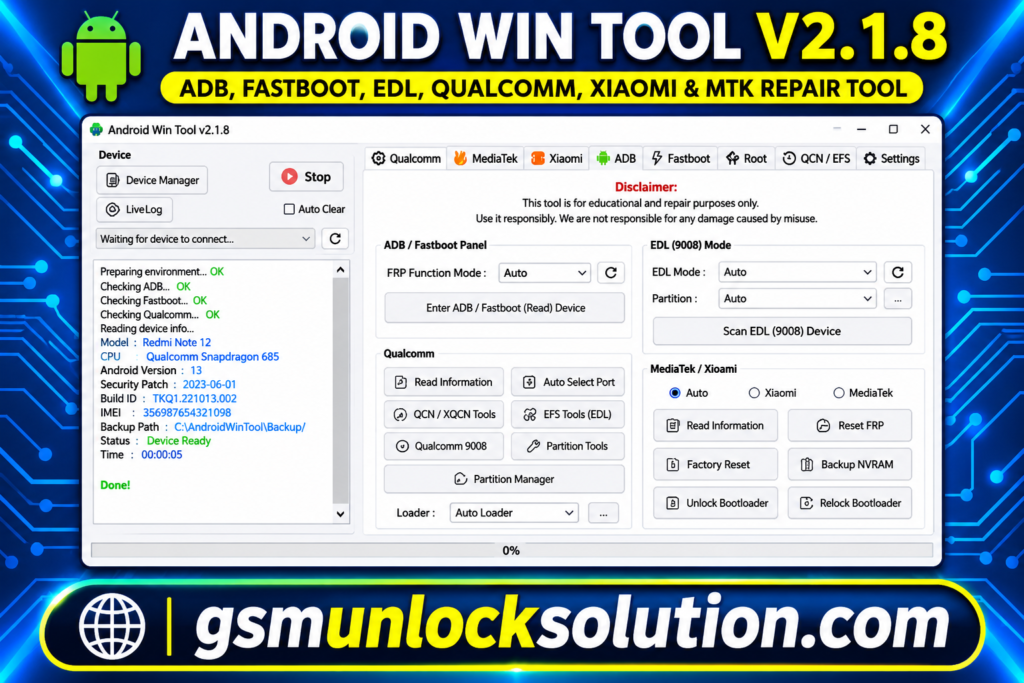
Main Functions of Android Win Tool
Qualcomm Repair
Android Win Tool provides useful repair options for Qualcomm-based smartphones. Technicians can access supported diagnostic functions to troubleshoot different device issues.
ADB & Fastboot Tools
It makes common Android operations easier with built-in command options. Users can install APKs, reboot devices, and perform other supported tasks.
QCN / XQCN Backup & Restore
The tool allows users to save and restore important device configuration files. These backups can help preserve network-related data during servicing.
EFS & Root Functions
It includes options for managing important device data and root-related operations. Users can also work with available recovery and diagnostic settings.
EDL Flasher
The EDL Flasher helps technicians perform firmware-related operations on supported phones. It also provides additional controls for managing the flashing process.
QLoader Services
QLoader provides several servicing options for compatible devices. Users can access device information and perform supported maintenance operations.
Partition Manager
Managing individual partitions becomes easier with the built-in partition tools. Technicians can view, back up, write, or erase supported partitions.
Xiaomi Support
The tool includes dedicated functions for selected Xiaomi and Redmi smartphones. It makes different software maintenance and recovery tasks easier to manage.
Xiaomi Fastboot Flasher
This feature helps users install firmware packages through Fastboot mode. It also offers additional settings to control the flashing process.
Xiaomi Auto Root
Xiaomi Auto Root provides a convenient way to check supported rooting options. Users can manage available root and unroot operations for compatible models.
Make Root
The Make Root feature helps prepare patched boot images using Magisk. It also provides useful controls for managing related boot settings.
Android & Fastboot Flash
This section brings several common device operations together in one place. It helps users perform supported commands without switching between different tools.
ADB Partition Manager
With this feature, technicians can view available partitions and manage them easily. It provides options for reading, writing, and erasing supported partition data.
Fastboot Partition Flasher
The Fastboot Partition Flasher makes partition-related work more convenient. Users can perform supported write and erase operations through Fastboot mode.
Apple MDM
Android Win Tool also includes a separate Apple MDM section. It provides access to the device-management options available in the application.
Pros and Cons
Pros
- Supports multiple Android servicing functions in one tool.
- Includes ADB and Fastboot operations.
- Provides Qualcomm EDL and QLoader support.
- Offers QCN/XQCN backup and restore options.
- Includes Xiaomi and Redmi-specific functions.
- Supports partition backup, writing, and management.
- Provides Magisk-based rooting options.
- User-friendly interface with organized repair modules.
Cons
- Some features work only with supported device models.
- Requires proper USB and chipset drivers.
- Certain operations need technical knowledge.
- Compatibility may depend on the Android version and security patch.
- Some advanced functions may require an internet connection.
- Incorrect flashing or partition operations can cause data loss or device issues.
System Requirements
| Requirements | Minimum / Recommended Specifications |
| Operating System | Windows 7, 8, 10, or 11 (32-bit / 64-bit) |
| Processor | Intel Core i3 / AMD equivalent or higher |
| RAM | 4 GB minimum (8 GB recommended) |
| Storage | Sufficient free space for installation and firmware files |
| Runtimes | Microsoft .NET Framework and Visual C++ Redistributables |
| Drivers | MediaTek VCOM/Preloader, Qualcomm HS-USB 9008, SPD, ADB, and Fastboot |
| USB Connection | High-quality USB data cable |
| USB Port | Direct motherboard USB port recommended |
Looking for another useful tool: Titan Tool V7.0.0 Free Download Setup for Windows 100% Working (2027)
How to Download Android Win Tool?
- Download the latest Android Win Tool from a trusted website.
- Extract the ZIP/RAR file using WinRAR or 7-Zip.
- Install the required Qualcomm, ADB, and Fastboot drivers.
- Open Android Win Tool by running it as administrator.
- Connect your supported Android phone using a reliable USB cable.
- Put your device into the required ADB, Fastboot, or EDL mode.
- Check the phone model, chipset, and connection status.
- Select the required function, such as firmware flashing, QCN backup, EFS management, or partition operations.
- Make sure the selected firmware files match your exact device model.
- Start the operation and keep the USB connection stable until completion.

Conclusion
Android Win Tool is a useful Windows-based utility for mobile repair technicians who regularly work with Android software issues. It brings different servicing options into one place, making tasks like device maintenance, firmware operations, partition management, and troubleshooting more convenient. With its Qualcomm, Xiaomi, ADB, Fastboot, and EDL-related features, it can be a helpful addition to a mobile repair workstation. However, users should always check device compatibility and create backups before performing advanced operations to avoid unexpected data loss.
FAQ’s
Is Android Win Tool free to use?
Android Win Tool may be available through free distribution sources, but its licensing and access conditions can vary depending on the version and distributor.
Does Android Win Tool require an internet connection?
Some functions may work without internet, while certain operations, authentication features, or online services may require an active connection.
Can Android Win Tool work on a laptop?
Yes, you can run Android Win Tool on a Windows laptop or desktop computer, provided it meets the software requirements and has the necessary drivers installed.
Why is Android Win Tool not detecting my phone?
This can happen because of missing USB drivers, a faulty cable, an incorrect connection mode, or USB port issues. Check the drivers and reconnect your device.
How can I check whether my phone model is supported by Android Win Tool?
Check the supported models list before starting any repair operation. Compatibility depends on the phone model, chipset, and software version.


One Comment