
TFT Unlock Tool v6.3.1.1 Free Download Setup for Android Devices [2027]
When an Android phone has firmware errors, boot problems, FRP locks, or software issues, repairs are difficult without the right tool. TFT Unlock Tool is a Windows-based Android servicing software solution. It is especially designed to help mobile technicians and users troubleshoot supported devices. It performs tasks such as firmware flashing, factory reset, device servicing, and selected FRP-related tasks. This tool combines multiple Android repair functions into one place.
What is TFT Unlock Tool v6.3.1.1?
TFT Unlock Tool is a Windows-based software designed for Android device servicing and software repair. It helps mobile technicians work with supported Android phones through a computer. TFT Unlock Tool includes different functions for firmware flashing, factory reset, device maintenance, and selected FRP-related operations. It provides a single interface for handling different software tasks without needing separate programs for every task.
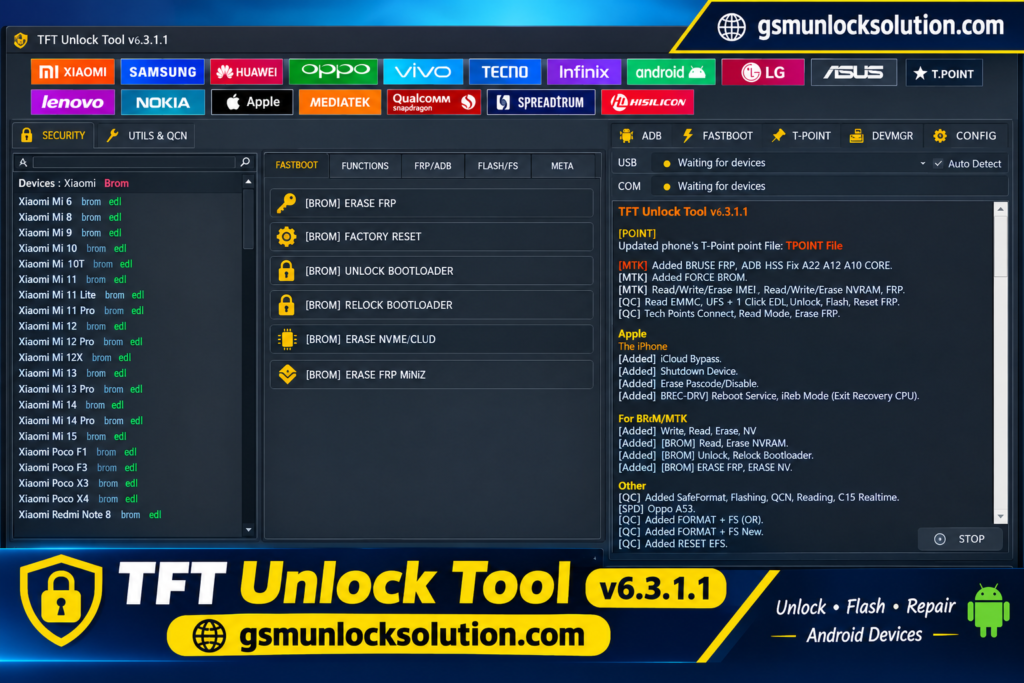
Main Functions of TFT Unlock Tool v6.3.1.1
Multi-Brand Android Support
TFT Unlock Tool supports servicing functions for selected Android brands. Available options depend on the device model and software version.
MediaTek (MTK) Support
The MTK module provides selected servicing options for compatible MediaTek-powered Android devices.
Qualcomm Device Support
The Qualcomm module offers chipset-specific servicing functions for supported devices, depending on the tool version.
FRP-Related Functions
The tool includes selected Factory Reset Protection (FRP) servicing options for compatible devices. These functions should only be used on devices you own or have permission to service.
Firmware Flashing
TFT Unlock Tool provides firmware flashing options for supported devices. Installing compatible firmware can help resolve certain software errors and boot problems.
Factory Reset
The factory reset function helps restore supported Android devices to their default settings. This process can erase personal data, so backing up important files is recommended.
Screen Lock Servicing
Some versions may offer screen-lock-related servicing options for compatible devices. Availability depends on the device model and supported security features.
Samsung Device Support
The tool provides selected software servicing functions for compatible Samsung smartphones, depending on the installed version.
Xiaomi Device Support
TFT Unlock Tool includes selected servicing options for supported Xiaomi devices, including certain software maintenance operations.
Huawei Device Support
Some versions offer servicing functions for compatible Huawei smartphones. Supported operations vary by model and software configuration.
USB Device Detection
The tool connects to supported Android phones through a Windows computer. Correct USB drivers, a reliable data cable, and the required connection mode can help the software detect a device properly.
Windows-Based Interface
TFT Unlock Tool provides a computer-based interface for accessing supported Android servicing functions in one place, making it useful for mobile repair technicians.
What’s New in TFT Unlock Tool?
- New device support.
- Bug fixes and performance improvements.
- Improved compatibility with supported Android devices.
- Better handling of Qualcomm and MediaTek (MTK) devices.
- TFT MTK Module and TFT QC Unlock Tool support.
- Improved USB driver installation and device detection.
- Better compatibility with supported Windows versions.
- Simplified interface for easier device servicing.
Pros and Cons
Pros
- Supports selected Android brands and chipsets.
- Offers MTK and Qualcomm servicing options.
- Includes firmware flashing and factory reset functions.
- Provides selected FRP-related servicing features.
- Combines multiple repair functions in one interface.
- Useful for mobile technicians and Android software maintenance.
- Works through a Windows-based interface.
Cons
- Some features may not work with every device model.
- Requires correct USB drivers for device detection.
- Certain functions may require specific connection modes.
- Unsupported firmware or incorrect files can cause software problems.
- Some features may vary between tool versions.
- Modified versions from untrusted sources may contain security risks.
- Factory reset and some servicing operations can erase user data.
System Requirements
| System Requirements | Details |
| Operating System | Windows 7, 8, 10, or 11 |
| RAM | 4 GB |
| Processor | Intel or AMD |
| Storage | At least 1 GB of free space |
| USB Connection | USB port and compatible data cable |
| USB Drivers | Required drivers for supported Android devices |
Download Information
| Information | Details |
| File Version | V6.3.1.1 |
| File Size | 302 MB |
| File Type | Compressed (ZIP & RAR) |
| Extraction Tool | 7-Zip or WinRAR |
| Supported OS | All Windows (32-bit and 64-bit) |
| Virus Status | Claimed to be scanned by Avast Antivirus |
| File Password | TFT |
Looking for another useful tool: Android Utility Tool V200.01 Free Download Setup Latest Version [2027]
How to download the TFT Unlock Tool v6.3.1.1?
- Visit the official website that provides the TFT Unlock Tool version you need.
- Find the download page for your required version, such as TFT Unlock Tool v7 or another compatible release.
- Check the version details, system requirements, and device compatibility before downloading.
- Download the setup file or archive to your computer.
- Scan the downloaded file with antivirus software before opening it.
- If the file is compressed, extract it using a suitable extraction program.
Conclusion
TFT Unlock Tool is a Windows-based solution for Android device servicing and software maintenance. It offers different functions, including firmware flashing, factory reset, device detection, and selected FRP-related operations for supported devices. The tool can help mobile technicians handle software problems through a single interface. TFT Unlock Tool may not work with every Android phone, so check if your device is supported first.
FAQ’s
Is TFT Unlock Tool Free?
Some versions are shared as free downloads, but availability and access may vary by version and source. Check the terms provided by the software publisher before using it.
Which Devices Does TFT Unlock Tool Support?
TFT Unlock Tool supports selected Android devices. Compatibility depends on the phone brand, model, chipset, software version, and available servicing functions.
Can TFT Unlock Tool Remove FRP?
Some versions offer FRP-related functions for supported Android devices. Use these features only on phones you own or are authorized to repair.
Can TFT Unlock Tool Remove a Screen Lock?
Some versions may provide screen-lock servicing options for supported devices. The available functions vary, and some operations may erase personal data.
Is TFT Unlock Tool Safe to Use?
Safety depends on the download source and the specific file. Avoid unknown modified versions, scan files before running them, and back up important data before servicing your phone.


One Comment